
Guidance for Completing the Device Section for PittPRO
Overview
This guide is intended to assist study teams in the completion of the PittPRO Devices page. If you are unsure whether your study is using an investigational medical device, please refer to the Guidance on the Use of Investigational Medical Devices in Human Subject Research.
Study Scope page
If the study will evaluate the safety or effectiveness of a device, Study Scope #9 must be answered “Yes.” Answering “Yes” will display an additional page later in the application for device-specific information to be included. If your study meets Device Scenario 1 on the investigational medical device flow chart, check “no” and describe your device in Research Activities.
If the study will use a device but not evaluate it for safety or effectiveness, Study Scope #9 should be answered "No". An example would be a study that uses an approved surgical device for adults in a pediatric population, but the study is only intended to evaluate a drug designed to accelerate healing after surgery.
Device Page
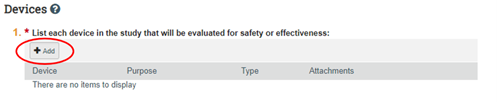
#1 Click the "Add" button to list each device in the study that will be evaluated for safety or effectiveness. If there is more than one device being evaluated in the study, use the “Add” button to create separate entries for each device. A pop-up box will appear to detail the device information:
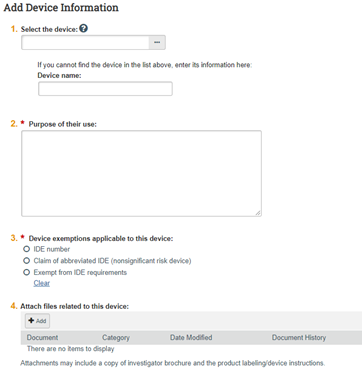
- #1 Select the device: Perform a search by typing the first letters of the device in the field. If the device is not contained in the drop-down menu, type the name of the device in the appropriate field.
- #2 Purpose of their use: Provide information related to the reason the device is being evaluated in the study.
- #3 Device exemptions applicable to this device: To complete this section, two factors must be known/determined. 1) the risk level associated with the device and 2) whether the device has any FDA-approved indication.
- Click “IDE number” if the protocol meets Device Scenario 5
- Click “Claim of abbreviated IDE” if the protocol meets Device Scenario 4
- Click “Exempt from IDE requirements” if the protocol meets Device Scenario 2a, 2b, 2c, or 3
- #4 Attach Files: Attach the documents as outlined in the last column of your Device Scenario # on the device cheat sheet
- Click "OK" to save and return to the main device page
Back on the Main Device Page, Click "Add" on #2 if you meet Device Scenario #5. A pop-up box for Add IDE and HDE Information will appear

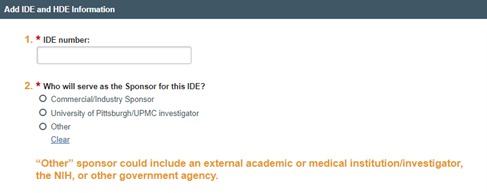
- #1 IDE Number: Type in the IDE number issued by the FDA
- #2 Who will serve as the Sponsor for this IDE:
|
Sponsor |
Explanation |
|---|---|
|
Commercial/Industry Sponsor |
Select Commercial/Industry Sponsor if a corporate company such as a drug manufacturer or CRO will act as sponsor of the IDE Application |
|
University of Pittsburgh/UPMC Investigator |
Select University of Pittsburgh/UPMC Investigator if a University faculty member or UPMC clinician will act as sponsor of the IDE Application |
|
Other |
Select Other if the IDE sponsor is not commercial/industry or a Pitt/UPMC investigator. If Other, identify the name of IDE holder and their institution. |
- Sponsor means a person who takes responsibility for and initiates a clinical investigation. The sponsor may be an individual or pharmaceutical company, governmental agency, academic institution, private organization, or other organization. In this instance, sponsor does not mean the source of financial support. It is important to select the correct choice to ensure that the study is routed to the appropriate Ancillary Reviewers.
- If the clinical trial is externally sponsored, the clinical trial documents provided by the sponsor should clearly indicate whether it is being conducted under an IDE.
Main Device Page, click “add” on #3: Attach files for any other documents that have not already been attached.

Attachments may include justification of risk determination, FDA correspondence and if the holder of the IDE is a University of Pittsburgh based, sponsor-investigator, attach both the FDA acknowledgement letter and approval letter.
Main Device Page #4: Describe your plan
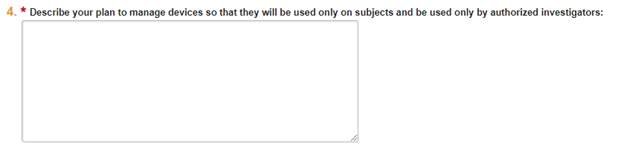
Address how the device will be secured: where will it be stored (e.g., locked cabinet in the OR) and how access will provided only to those authorized investigators (e.g., process for distribution).
Click "Continue" to complete the rest of the submission.
4/18/2025